How to Change the Audio Source in Vista/7/8?
The method of changing audio sources
in Vista/7/8 differs than in XP. Please follow these steps to change
the audio source using Windows Vista/7/8.
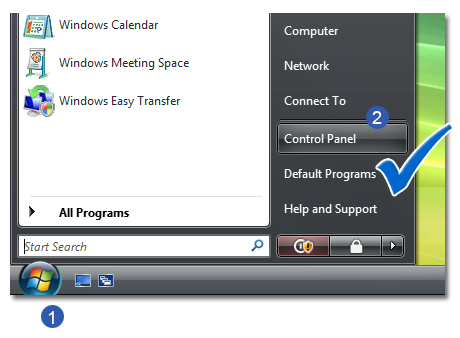
- Click the
 Windows
Start button in the lower left hand side. Windows
Start button in the lower left hand side.
- Click the
 Control
Panel button Control
Panel button
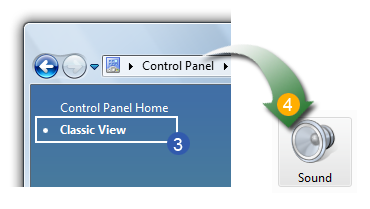
- On the left hand side of Control Panel, make sure "
 Classic
View" is selected. Double click the " Classic
View" is selected. Double click the " Sound"
icon (This should appear as a speaker) Sound"
icon (This should appear as a speaker)
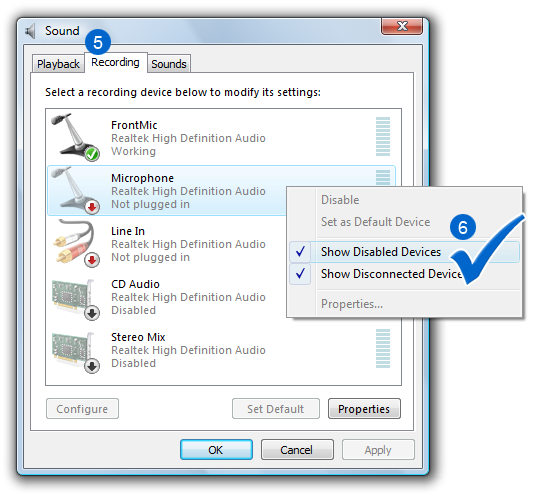
- Once these properties come up, select the "
 Recording"
tab Recording"
tab
 Step1
- Step4 Alternative: Click the button Mixer
in Smart Audio Editor recording window. Step1
- Step4 Alternative: Click the button Mixer
in Smart Audio Editor recording window.
- Depending on the sound cards and devices setup on your
computer, you may have a list of different options shown
here. Right click on a white space and select
 Show
Disabled Devices from the pop-up menu. Show
Disabled Devices from the pop-up menu.
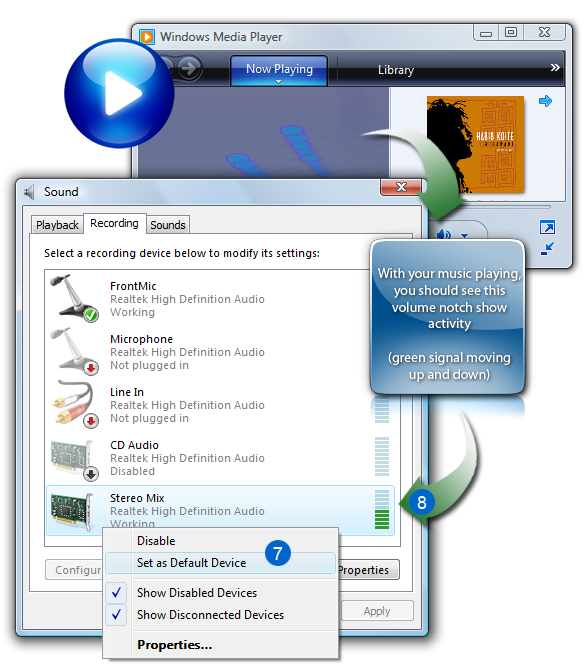
- Since it will vary on different computers, you may want
to select the first item in the list and click "
 Set
As Default" Set
As Default"
- You will see a
 small
volume notch on the right hand side. With your
music playing, you should see this volume notch show activity
(green signal moving up and down) small
volume notch on the right hand side. With your
music playing, you should see this volume notch show activity
(green signal moving up and down)
- If you do not see this activity, please keep your music
going, but select the next item in the list and click "Set
As Default.
- Once you have selected and found the appropriate device,
simply click Close, and you are set to
go.
|
|