How to Extract Audio from DVD-Video?


Overview

SpeedEase Video DVD Copy is a feature-rich DVD converter program that allows users to extract sound segment from video DVD like the ones you rent in a videoclub or buy in a video shop. Enjoying DVD music anywhere without carrying a whole bag of discs is no longer a hassle.


Download SpeedEase Video DVD Copy


Step 1. Add DVD Movies

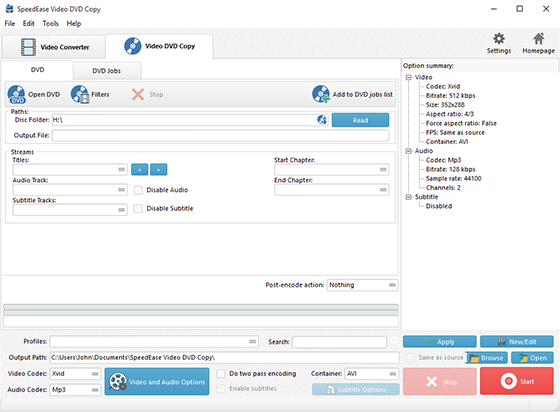
Launch SpeedEase Video DVD Copy and insert a video DVD to the disc driver. Click "Add DVD" 1 or "Add DVD Folder" 2 to add the video to the task window.

Add DVD Movies

Step 2. Choose What You Want to Extract

Then, the available titles of the disc will be displayed in a title list. You can choose titles 1 from the list and select Audio Track 2 & Subtitle 3 or disable them as needed. Enter the number of the starting and ending chapters to choose any chapter 4 of the titles to extract. You can preview the whole DVD or the selected title with our built-in DVD player 5. You are allowed to take a snapshot 6 of the scene displayed in the preview window as BMP or JPEG format.

Choose What You Want to Extract

Step 3. Customize Output Settings

Activate "Copy as" 1 menu and three tabs: "Video", "Devices" & "Audio", containing various supported formats, are displayed. Click "audio" tab and choose an output format according to your demands. For specific needs, you can adjust the output quality with the well-configured presets for every format in the "Preset" dropdown list 2. Click "Browse" 3 to choose an output folder to backup the extracted sound. Then, click "Start" to start extraction 4.

Customize Output Settings

Step 4. Start Extraction

After you hit "Start", a progress window 1 will be displayed within just few seconds. The post-process options 2 can be chose to play a sound or shutdown the computer when the extraction is finished.

Start Extraction

When the window disappears, the DVD video has been successfully extracted. If needed, click "Find Target" 3 to directly open the output folder to get the extracted audio files.

Get the Extracted Audio Files


Download SpeedEase Video DVD Copy